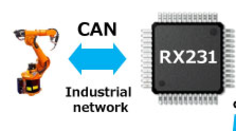











CANopen realizes a communication model using the serial bus network 'Controller Area Network' (CAN) and the software assimilation to it with the CAN Application Layer (CAL).

Developed originally for passenger cars, the CAN two-wire bus system is already in use in over one million industrial control devices, sensors and actuators. Hallmarks of the internationally standardized bus system (ISO 11898) are its simplicity, high transmission reliability and extremely short reaction times. Many major semiconductor manufacturers sell CAN chips and the fact that millions of them are used in automobiles guarantees low chip prices and long-term availability. Thanks to their convincing technology, CAN and CANopen are becoming established without a great deal of marketing efforts.
CiA maintains the CANopen specifications, including device profiles for I/O modules (CiA DS-401), for electric drive systems (CiA DSP-402) and many more. The process of defining new profiles is continually performed. An independent test and certification process is available at CiA.
A number of CANopen implementations (OEM code) and many CANopen products are already available. CiA regularly publishes an up-to-date catalog of CANopen products and of certified ones.
The network management specified in CANopen simplifies project design, implementation and diagnosis since all stations have the same default network and device parameters. The user can set all parameters himself if he wishes to optimize the CANopen network or extend its functions. Configuration tools for this purpose are available from a number of manufacturers. One is the CANopen Device Monitor optimized for testing CANopen devices developed with our Library.
CANopen permits both cyclic and event-controlled communication. This makes it possible to reduce the bus load to a minimum and achieve high communication performance at relatively low baud rates.
Among the distinguishing features of CANopen are its support for data transport at the supervisory control level as well as integration of very small sensors and actuators in one physical network. In this way CANopen allows both simple and complex devices to be networked. Gateways linking sensor/actuator bus systems and hierarchically higher communication systems are not essential in automation systems based on CANopen. Even PCs at the supervisory process-control level can listen to selected process data in the CANopen network without impairing data traffic with high real-time requirements. Lean networking reduces the number of different bus systems, thus reducing the cost of trai- ning, implementation and stock-keeping.
In conventional master/slave bus systems the performance of the master component determines the real-time behaviour of the network as a whole. Usually slave components cannot communicate with each other direct, which means that at least two data transfers are required. This increases not only the volume of communication but also increases the risk of transmission errors. CANopen avoids these disadvantages. In CANopen, timing behaviour can be adapted individually to the particular tasks of the stations involved. This means it is not essential for the entire communication system to have higher performance if it is only required by certain participants. In addition, an automation task may be divided up among several CANopen participants to make optimum use of the power of control devices already in the network, and this can be gradually increased by additional participants.
CANopen allows the creation of inexpensive de-centralised control systems, distributed input/output systems and networked sensor/actuator systems. Entire production cells can be automated using intelligent devices networked via CANopen. CANopen's first users were in the field of mechanical engineering (e.g. packaging, textile and printing machines) and manipulating (e.g. robots and driver-less transport systems). CANopen is also used in materials handling systems (e.g. conveyor belts and high-rise warehouses) in mobile applications (e.g. construction machines and fork-lift trucks) and in building services automation (e.g. air-conditioning and elevators). CANopen may also be integrated into image-processing systems for quality assurance. After careful consideration, many international mechanical engineering companies have decided on CANopen.
CANopen is a set of existing and emerging profiles and was originally based on CAN Application Layer (CAL). CAL was the first available open application layer specification for CAN. Because CAL specifies a variety of data objects and services, the usage of these services was not easy. The CANopen Communication Profile comprises a concept to configure and communicate real-time-data as well as the mechanisms for synchronization between devices. Basically the CANopen Communication Profile describes how a subset of CAL services is used by devices. The restriction to a subset hereby reduces the amount of needed program memory to implement an open application layer.
Now all CANopen mechanism and services are completely defined in the CANopen Application and Communication Profile.
The CANopen Device Profile describes the functionality of a particular device type and the communication with this device.
Two data types with different characteristics are dominating most automation networks and also CANopen. That are messages for process and service data. Further CANopen defines an interface for data access. All data and parameter of a device, which should be visible from CAN, can be reached via the object dictionary.
All device parameters are stored in an object dictionary. This object dictionary contains the description, data type and structure of the parameters as well as the address from others point of view. The address is being composed of a 16 bit index and a 8 bit sub-index and guarantees therefore compatibility with existing device profiles (e.g. DRIVECOM). Only the CANopen specific entries have no correlation with other profile definitions. The sub-index refers to the elements of complex data types e.g. arrays and records (table 1).

Table 1, Organization of Complex Data Types
The following C - Structure is the equivalent of the contents in table 1.
typedef struct {
UNSIGNED8 NumberOfEntries;
UNSIGNED16 BaudRate;
UNSIGNED8 NumberOfDataBits;
UNSIGNED8 NumberOfStopBits;
UNSIGNED8 Parity;
} RS232_T;
The object dictionary is organized in different sections (table 2).

Table 2, Object Dictionary Structure
The communication profile specific part contains the communication parameters. The device specific part is divided in two parts. The first contains the manufacturer specific device entries and the second data and parameters of standardized profiles. The device specific part is specified in the device profile and in the communication entries from the common subset of all devices. Therefore they are specified in the communication profile.
There are a range of mandatory entries in the dictionary which ensures that all CANopen devices of a particular type show the same behaviour. The object dictionary concept caters for optional device features which means a manufacturer does not have to provide certain extended functionality on his device, but if he wishes to do so he has to do it in a pre-defined fashion. Additionally, there is sufficient address space for truly manufacturer specific functionality. This approach ensures that the CANopen device profiles are future proof.
Service Data Messages, in CANopen called Service Data Objects SDO, are used for read and write access to all entries of the object dictionary of a device. Main usage of this type of messages is the device configuration. Besides reading and writing of the parameters and data, it is possible to download whole programs to the devices. SDOs are typically transmitted asynchronously. The requirements towards transmission speed are not as high as for PDOs. The SDO message contains information to address data in the device object dictionary and the data itself. Most existing profiles use 3 bytes to address objects, divided in two bytes for an index address and one byte for the sub-index address. Using the same scheme and considering one byte for the protocol remaining four bytes for parameter data. Therefore a SDO transfer consists of a CAN message to initiate and perform data transfer and a CAN message for handshake.

Figure 1, SDO Communication Principle
Figure 1 shows the communication between two devices.
There are two variants for SDO usage. The first one is a
write access and the second one a read access to the
SDO-Server object dictionary. The left device initiate a
write service with a SDO write request. The SDO-Server
indicates the message, writes the value to the object
dictionary and gives a response to the CAN network. The
client gets a confirmation of that service. At a read
request the confirmation message contains the read data. If
it is necessary to transfer more then 4 byte, e.g. whole
arrays or files, a sequence of segmented messages will
follow the initiate transfer message, each handshaked by the
data server. See figure 2 for the SDO protocol.

Figure 2, Multiplexed Domain Protocol for SDOs
Contrary to the PDOs the SDOs get low priority CAN identifiers. There are two device types for SDO handling. The first is the SDO-Server. These devices can not initiate a SDO service request. They can only react to a SDO indication. Such reactions are writing or reading values to/from the local object dictionary. The COB-IDs for the first Server-SDO is predefined and can not be changed in order to ensure the connection to the device. The COB-IDs are built like follow:


The equations are valid of the SDO-Server point of view. Every CANopen device must be a SDO-Server. The equivalent are the SDO-Clients. They initiate SDO services. Typical SDO-Client applications are configuration tools and control units. Each device can support up to 128 Server-SDOs and 128 Client-SDOs. The corresponding entries in the object dictionary are:


The SDO parameter are organized in a structure (table
3). All entries can be changed besides the value for the
first Server-SDO. The index
is only a reference to the structures type. It has to be
replaced with the computed index mentioned above.

Table 3, SDO Parameter Structure
Process Data Messages in CANopen called Process Data
Objects PDO are used to perform the real-time data transfer
between different automation units. PDOs have to be
transmitted quickly, without any protocol overhead and
within a predefined structure.
For the PDOs different transmission modes are distinguished
(figure 3):

Figure 3, PDO Transmission Types
The asynchronous PDOs are sent on event (application/profile specific or timer) or on a remote request. The synchronous PDOs can be triggered cyclic or acyclic with the SYNC message.
An explicit confirmation for PDOs is not required. It is a CAN layer 2 message and carries no overhead. CANopen suggest a high priority in order to ensure their real-time behaviour. CANopen defines PDO-Server and PDO-Clients. The server sends PDOs and the client receives PDOs. Commonly a CANopen device can fulfill both properties.

Figure 4, PDO Communication
The communication parameter of a PDO resides in the object dictionary. The indices for PDOs are built like follow:


The range of the PDO numbers is 1..512. that means up to
512 receive PDOs (RPDO) and up to 512 transmit PDOs (TPDO)
are possible for a device.
The communication parameter of PDOs are described with a
structure (table 4). The index
is only a reference to the
structures type. It has to be replaced with the computed
index mentioned above. The sub-index 0 contains the number
of implemented PDO parameter. Only sub-index 1 and 2 are
mandatory. Subindex 1 describes the used COB-ID of the PDO.
A detailed description is shown in table 6. A PDO
communication channel between two devices is created by
setting the TPDO COB-ID of the first device to the RPDO
COB-ID of the second device. For PDOs a 1:1 and a 1:n
communication is possible. That means there is always only
one transmitter, but an unlimited number of receivers. The
transmission type (sub-index 2) describes the kind of
transmission see table 5. For synchronous PDO it is possible
to define a scaling factor. Transmission type 1 means
PDO will be triggered with each SYNC Object. If this entry
has the value 240, the PDO will be sent/received with each
240th SYNC. The optional entry inhibit time defines a
minimum time period between two PDO transmissions. This
feature ensures that messages with lower priorities than the
actual PDO can be transmitted in the case of continuous
transmission of the actual PDO. The second optional
parameter is only relevant for asynchronous Transmit PDOs.
It defines an event timer. If the event time elapsed, the
transmission of this PDO is started.

Table 4, PDO Communication Parameter Structure

Table 5, Transmission Types

Table 6, COB-ID Code
The contents of the PDO is encoded in the PDO mapping entries. A PDO can contain up to 64 single data elements from the object dictionary (in the case of 64, that are bit data). The data are described via it's index, sub-index and length. The mapping parameter of a PDO resides also in the object dictionary. The mapping indices are built like follow:


The index
is only a
reference to the structures type. It has to be replaced with
the computed index mentioned above. The sub-index 0 contains
the number of mapped variables. The maximum of entries is
either 64 or 8. This fact depends on the mapping
granularity. (this is an feature of the CANopen library
implementation, not of the standard). Some devices support
only byte wise PDO mapping. The sub-index defines the order
of the variables on the CAN telegram (PDO).

Table 7, PDO Mapping Parameter
The entries from sub-index 1 contain a logical reference to the variables, which are to transmit/receive (table 8). The date is described by it's index and sub-index and it's length. The length value signs the data's length in bits. Therefore it is possible to transmit only the relevant range of the data i.e. 3 bits of a C char value.

Table 8, Structure of Mapping Entry
A special case of mapping is the so called dummy mapping. At this kind of mapping, it is possible to blind out irrelevant data. This feature is used for a 1:n communication, where each receiver utilizing only a part of the PDO. For dummy mapping the indices 1-7 are used. This indices are only references to data types. This entries are only space holders with the type corresponding size (table 9).

Table 9, Indices of PDO Dummy Mapping Types
The mapping for the PDO can be static or changeable. If the mapping can be changed, it is called variables PDO mapping. Changing of mapping can be done in the state pre-operational (default) or operational. During operational state the configuration application is responsible for the data consistency.
The Emergency Message (EMCY) is a service, which signs
internal fatal device errors. The error types are defined in
the communication profile and the device profiles. The EMCY
is transmitted with highest priority. CANopen defines
EMCY-Server and EMCY-Clients. The server transmits EMCYs and
the clients receive them. The EMCY telegram consists of 8
bytes. It contains an emergency error code, the contents of
object
and 5 byte of
manufacturer specific error code. Additionally an error
handling exists. Each transmitted error code and the first
two bytes of the manufacturer specific code will be pushed
in the predefined error field on Index
. This field can contain up
to 255 error entries. The value of sub-index 0 shows the
actual number of entries. The last error will be always
insert on the top of this field (sub-index 1). All older
entries will be moved down. Are no error more on the device,
an EMCY with error code 0 will be sent.
The SYNC Object is a network wide system clock. It is the trigger for synchronous message transmission. The SYNC has a very high priority and contains no data in order to guarantee a minimum of jitter.
The Time Stamp Object provides a common time reference. It is transmitted with high priority. The time is encoded in the type Time of Day. This data type contains the milliseconds since midnight and the number of days since January 1, 1984.
For node monitoring two different mechanisms are defined. They are called Node Guarding and Heartbeat. Each device has to provide one of the error control mechanism.
The Node Guarding (Life Guarding) is the periodical
monitoring of certain network nodes. Each node can be
checked from the NMT master with a certain period ( guard
time,
). A second
parameter ( life time factor,
) defines a factor when
the connection should be applied as lost.
The resolution of the guarding time is 1 ms. The condition for node guarding on a slave device is that guard time and life time factor are not zero. The guarding is started with the first guarding telegram of the master.
During node guarding the master sends a RTR frame to each guarded slave. The slave answers with it's actual state and a toggle bit. This toggle bit alternates for each cycle.
Node Guarding has
a big influence to the network load!
The Heartbeat is an error control service without need
for remote frames. The Heartbeat producer transmit cyclic a
heartbeat message. One or more heartbeat consumer receive
this message and monitoring this indication. Each heartbeat
producer can use a certain period ( heartbeat producer
time,
). The heartbeat
starts immediately if the heartbeat producer time is unequal
null.
The heartbeat consumer has to monitor the heartbeat
producer. For monitoring the heartbeat consumer has an entry
for each heartbeat producer at its own object dictionary.
The heartbeat consumer time
(
) can be different for each
heartbeat producer but should be greater than the heartbeat
producer time. Usually the heartbeat will be configured by
the network configuration manager.
The resolution of the heartbeat times is 1 ms.
Heartbeat has a
big influence to the network load! (but in effect, the half
of the load of the node guarding monitoring)
After a CANopen node has finished its own initialization and entered in the node state PRE-OPERATIONAL he has to send the Boot-up Protocol -Message. This message indicated that the slave is ready for work (e.g. configuration). This protocol is using the same identifier as the error control protocol (Nodeguarding or Heartbeat).
Another simplification for CANopen is the definition of
a minimal boot-up procedure for devices, shown in the state
diagram in figure 5.

Figure 5, Minimal Boot-Up Procedure
Devices with the minimal boot-up procedure contain only
three states the pre-operational, the stopped
and the operational one. The difference between
master and slave devices is the initiation of the state
transitions. The master controls the state transitions of
each device in the network. After power-on a device is going
to be initialized and set in the state
pre-operational automatically. In this state reading
and writing to its object dictionary via the service data
object (SDO) is possible. The device can now be configured.
That means setting of objects or changing of default values
in the object dictionary like preparing PDO transmission.
Afterwards the device can be switched into the
operational state via the command Start Remote
Node in order to start PDO communication. PDO
communication can be stopped by the network master by simply
switching the remote node back to pre-operational by
using the Enter Pre-Operational State command. Via
the Stop Remote Node command the master can force the
slave(s) to the state stopped. In this state no
services besides network and error control mechanism are
available. The command Reset Communication resets the
communication on the node. All communication parameters will
be set to their defaults. The application will be reset by
Reset Node. This command resets all application
parameter and calls Reset Communication command. All
needed NMT commands with minimal boot-up use only CAN
identifier 0. The commands are distinguished with a command
specifier in the first data byte of the NMT message (table
10).
The second byte specifies the meant node ID. If the node ID
is zero the command is valid for all nodes in the network
(broadcast).

Table 10, NMT Master Telegram

Table 11, Validity of CANopen Services
In order to reduce configuration effort for simple networks a mandatory default identifier allocation scheme is defined not only for NMT messages, also for the other services. These identifiers are available in the pre-operational state directly after initialization (if no modifications have been stored) and may be modified by means of dynamic identifier distribution or SDO access (default way). A device has to provide the corresponding identifiers only for the supported communication objects.
The pre-defined master/slave connection set supports one emergency object, one Server-SDO, at maximum 4 Receive-PDOs and 4 Transmit-PDOs and the error control objects. The COB-ID is built from a function code, representing the object type, and the 7 bit module or node-id. Table 12 shows a simplified version of what you can find in CANopen DS 301 2 .

Table 12, Function Codes for default COB-IDs 3
The resulting COB-ID for a object is built:

The default COB-ID distribution is only useful for peer to peer communication between a control application and the nodes. In order to use the advantages of CAN a COB-ID distribution after boot up is necessary. The COB-IDs for the services SYNC, TIME, EMCY, PDO and SDO can be parameterized in the range of 1-1760. In this range only the COB-IDs of the used 1st SDO-Server is reserved. The order of priorization should be SYNC, TIME, EMCY, synchronous PDOs, asynchronous PDOs and SDOs. The distribution can be done via SDOs.
A summary of all services from DS301 is provided here.
4
The CANopen services are listed in respect to the CiA
Standards DS 301 and DS 302. Further the function names of
port's CANopen implementation are shown.
- Define SDO - defineSdo() - Write SDO - writeSdoReq() - Read SDO - readSdoReq()
- Define PDO - definePdo() - Read PDO - readPdoReq() - Write PDO - writePdoReq() - Write Multiplexed PDO - writeMPdoReq()
- Define SYNC - defineSync() - Write SYNC - startSyncReq() / stopSyncReq()
- Define EMCY - defineEmcy() - Write EMCY - writeEmcyReq()
- Define TIME - defineTime() - Write TIME - writeTimeReq() - Read TIME - readTimeReq()2.4. The CANopen Device Profiles
A device profile defines a standard device. For these standard devices a basic functionality has been specified, which has to exhibit every device within a class. The CANopen Device Profiles ensure a minimum of identical behaviour for a kind of devices.
The layers of a device profile is shown in figure 6.

Figure 6, Communication Architecture for DSP 402
Each device has to fulfill the requirements on the behaviour i.e. the implemented state machine. Further it has to support all mandatory objects. This objects are parameter and data for the device. Additionally the manufacturer can decide about supported optional objects. All parameters and data, which are not covered by the standardized device profiles can be realized as manufacturer specific objects.
Actually there are four profiles supported by port's CANopen Library (respective the Design Tool):
| - | DSP 401, Device Profile for I/O |
| - | DSP 402, Device Profile for Drives and Motion Control |
| - | DSP 403, Device Profile for Human Machine Interfaces |
| - | DSP 406, Device Profile for Encoders |
Implementation of these device profiles can be done very easy by using the CANopen Design Tool. That tool provides databases with all objects for the standardized device profiles. Furthermore source code templates for realizing state machines and other functions are available.
The engineers by port have been involved in definition of the standard DSP 402 for drives and motion control and take the chair in this Special Interest Group of CiA e.V..